jeroezie
-
Posts
302 -
Joined
-
Last visited
-
Days Won
3
Recent Profile Visitors
2553 profile views


-
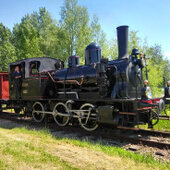 Patch 1.7 changelog Added BR285 as a playable loco class; Added BR285 to some of the randomised bot trains, Ty2 does share the sidings with the diesel now; Changed towed loco options. Only ET22 and ČD163 can be towed if you drive either loco class. Only these locomotives should have proper dead tow mechanic (the game currently only supports passive rive instead of dead tow, known bug); The 242xxx bot train, which used to be the green/grey BR186, is now randomised from any BR186 repaint. Bugfixes: Bot 446034 displays its proper left track front signal; Fixed departure of some bots around Katowice; Lots of small stuff I have forgotten... Unfortunately combing electric multiple units (EN51/71 and Impuls2) does not work as intended, I do not know why. You can simply slam the EMU to the other one and activate the second train afterwards.
 -
When I spawn a BR285 loco in my single player scenario, I can not change the G/P/R setting of the triple valve using the DMI. I can input the new setting and but it will simple revert to the old one almost instantly. Game build 30/09/2026 - 20:41.
-
Game crashes ERROR: SymGetSymFromAddr64
jeroezie replied to jeroezie's topic in Bug reporting [Singleplayer]
The problem manifested itself today again. SimRail_log_2026-10-04_16-23-53.txt Crash_2026-10-04_150841661.zip -
Twice I had the game crash on my. In both cases the log ended with these kinds of errors: "[2026-10-03 18:07:53]: ERROR: SymGetSymFromAddr64, GetLastError: 'Poging om toegang te verkrijgen tot ongeldig adres.' (Address: 00007FFC19459657) [2026-10-03 18:07:53]: 0x00007FFC19459657 (UnityPlayer) (function-name not available)" I have no clue if that is the actual problem or something else, but needed to put something for the bug report title, so I just used this for it. 'Poging om toegang te verkrijgen tot ongeldig adres.' is Dutch for 'Tried to get access to invalid address.' I was testing a custom scenario and driving BR285, it happened at a different place. I do not know if my own scenario played a role or not. I will upload both log and crash dumps and my scenario just in case. Feel free to let me know, if proving custom scenario's is useful for debugging or not. Game build 30/09/2026 - 20:41. SimRail_log_2026-10-03_17-25-29.txt SimRail_log_2026-10-03_16-18-32.txt Crash_2026-10-03_160753242.zip Crash_2026-10-03_145352393.zip Jeroezie_Lazy_Katowice_Cargo scenery (crash during test 03-10-2026).zip
-
You kept etcs in isolation mode? That is should not he able to limit you at anything.
-
You could turn off the train protection (both SHP and ETCS) by activating etcs isolation mode. You can do this using the swicht on the cabin back wall. Then etcs will only shiw a very simple spedometer and close its emergency vrake valve and it will be unable to do anything else (such as forcing you to stop).
-
They are actually working on Dresden en DMU, I believe but do not pin me, Desirio, DLC. I suppose Br285 will come in handy too for cargo traind.
-
The BR285 (TRAXX) Diesel Loco
jeroezie replied to BigVern's topic in General Discussion [Multiplayer]
I assume singleplayer SimRail made scenario's will get Br285 option soon. I I rememver right, most scenario's work with Eridor libary and then (if I am not mistaken) the locomotive menu is run from the libary instead of the actual scenario. So its relifivly easy to add Br285 in bulk to scenario's. Only the timetable would be off and then their is of course the wagon/carriagre train composition. Obviously will add it to my own relevant scenario's. I really hope the big virtual dispatcher bug gets fixed since it causes mayham to lots of scenario's. -
Their is indeed a single cabin. But their is this bug causing it to get mixed up when coupling after shunting. Just flipping it might solve the issue.
-
Yes and so? It still needs radio for network acceptance for running on the modern railroad. It has the same als old radio in the ET22, EU07 etc. Same equipment and same bugs. Only defferance is a single cab unit with speaker/mic. But the game can still mess uo the A and B cab for the radio splitter, it is in the overhead cabinet in the back wall of the cabin. Please make sure its turned on and give the other cab on the splitter a try if it refuses yo work.
-
Have you checked the radio equipment in the overhead cabinet? Normally set radio splitter to cab A but if that does not work, try cab B instead, sonetimes the game does weird stuff with the A / B cabin and they get swiched around.
-
The white light for Lodz Chojny signals E, F, M and X are not shown/flashing on the dispatchers panel when setting Sz signal. It is just off for some reason. This are all signals that can not show normal signal routes, only red and Sz. Game build 20/08/2026 - 16:26.

-
Why the unusual exit signal at Bedzin?
jeroezie replied to NeatKefe's topic in General Discussion [Multiplayer]
Is that not a very expensive and inflexible solutuin? An simple ABS sigbal would do just fine in the Bedzin case. And it does not anwser the hard interlocking requirment enforing the extra signal to be clear for the sigal inside the station to be clear (usually it would be silly to hace a train depart in yellow but now it has been made 100% impossible in a weird siruation it would have been needed). -
The Kutno shunting signals Ttn2 and Tn3 have in game a sign with signal number Tn2 and Tn3 respectively, instead of the usual Tm<number>. Location: S: kutno-lowicz-zgierz_terrain_x24_z430, P: (12453.56, 109.19, 220301.50), R: (5.96, 291.45, 0.00). Game build: 20/08/2026 - 16:26.
-
Expected developments?
jeroezie replied to 72only's topic in Suggestions for improvements [Singleplayer]
We already have live real life weather in multiplayer